LSP for AI Coding Agents: The Protocol Your Agent Isn't Using YetLSP для AI кодинг-агентов: протокол, который ваш агент ещё не используетLSP für AI Coding Agents: Das Protokoll, das Ihr Agent noch nicht nutztLSP pour les agents de code AI : le protocole que votre agent n'utilise pas encore面向 AI 编程 agent 的 LSP:你的 agent 还没用上的协议
Your agent guesses. It matches names as text and hopes the right line was in what it read. A language server replaces the guessing with code intelligence, because it parsed your code and knows.
For almost a year now I have been working as an AI Enablement Lead at a product company, and I am responsible for research and AI adoption among software developers and QA. On our codebase LSP cut the agent’s token usage by 16-22% and its execution time by 30-40%. Everything below rests on my own tests and on an independent benchmark from CircleCI.
What LSP is
LSP (Language Server Protocol) is a standardized protocol for communication between a code editor and a server that analyzes the source code and provides information about it.
Before it appeared in 2016, every smart editor feature had to be written again for every language. You want proper Python in VS Code, someone sits down and writes a plugin. You want the same thing in Vim, everything starts from scratch, because the API there is different. In Emacs, from scratch again. Ten editors for twenty languages, that is two hundred separate plugins, and their quality is very different.
LSP removed this nonsense with a single agreement. The language team writes one program (pyright for Python, gopls for Go, rust-analyzer for Rust), the editor team writes one wrapper, and after that everything works with everything.
How LSP got into the LLM world
The first well-known paper at the intersection of LSP and LLM appeared in June 2023 at Microsoft Research (arXiv 2306.10763).
Back then AI was still bad at software development, and there was one key problem. When an LLM types code and accesses an object, for example an instance of a class, it has no way at all to find out which methods this object actually has, if its definition sits in a neighboring file. There was nowhere to look. The model of that time simply typed text from left to right, with no tools, with no way to find something and open it. Functions and tool calls appeared in the API on June 13, 2023, in exactly the same month as this paper, and the first proper agents were still almost a year away.
This is exactly the point where the model started to hallucinate, making up something that looks like the truth. Imagine that developers had their IDE with IntelliSense taken away, were put into Notepad, and had the rest of the project files locked away. And here you are typing user. and trying to remember how it was: username? email? or maybe name after all?
The researchers started thinking about how to solve this problem, and they came up with this idea.
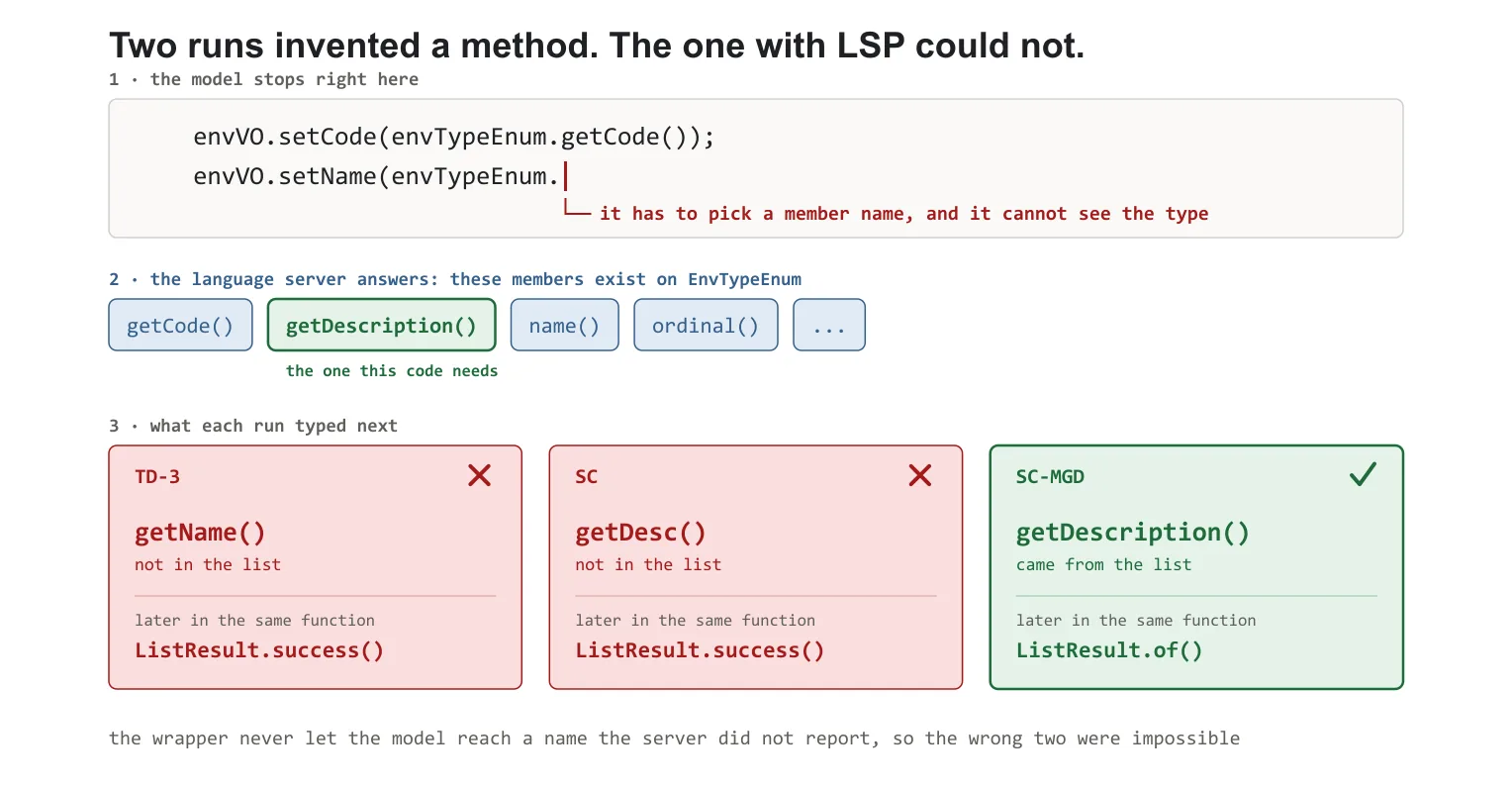
The model types code not in words but in tokens, and at every step it picks the next one from a list of candidates. At the moment when it puts a dot after the object, the generation is paused and the language server is asked which members this object really has. The list that comes back does not go into the model, it goes into the wrapper around it, and the wrapper simply crosses out of the candidates all the names that do not exist in the project. The model then picks from what is left, so it physically cannot type a method that does not exist.
This approach was called Monitor-Guided Decoding. In Java the compilation rate went up by 19-25%, and there was no need to retrain the model for it.
This is the first well-known paper where the language server does not just feed the model context, but limits it. And the side product turned out to be more important than the experiment itself: to call the servers from Python, the authors wrote the multilspy library. This is exactly what solid-lsp later grew out of, inside Serena, which is the most popular LSP tool for agents (27 thousand stars at the time of writing). So the chain is direct: research from 2023 gave a library, the library gave the agent tooling of 2025-2026.
How it works
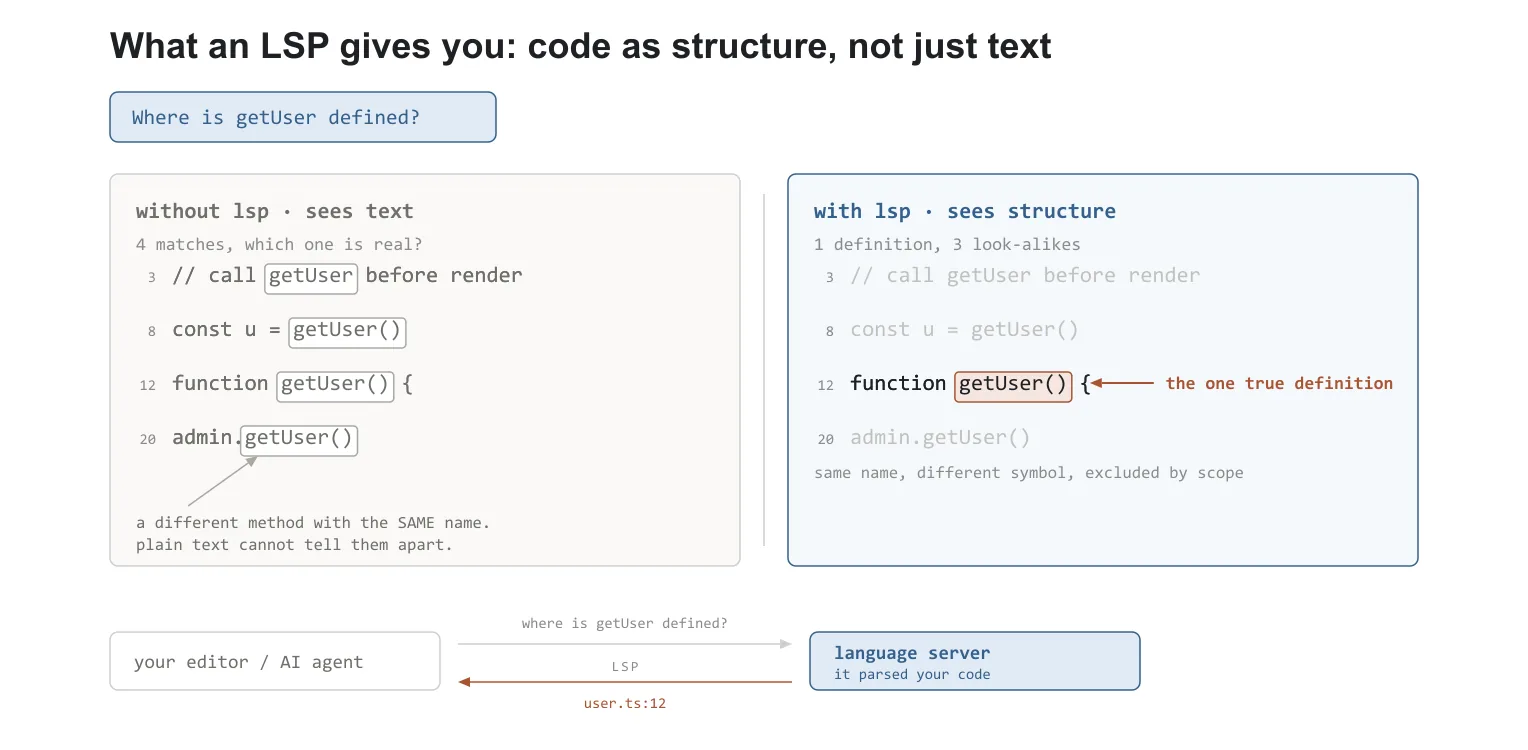
By default, an LLM works with your code as plain text, and it cannot do even a basic “go to definition”. For the agent to find the definition of an object, it has to use plain text search and collect the information it needs with the grep tool.
Modern models already do this well enough and they do not overload the context. For example Opus 5, when it looks for the definition of some object, does not read the whole file at once but finds only what it needs. But if the project is big and the dependencies are complex, this can take more tokens, more time, and in some situations it can also lead to errors.
LSP, in turn, gives the agent access to the language server, and behind that server there is a semantic model of the project, and the LLM gets a large number of tools for more flexible and more precise navigation through the code. This is especially visible on weaker models (the study below will confirm this).
LSP does not replace grep, it only extends what the LLM can do.
Why so few people talk about LSP
Even though the first use of LSP together with an LLM was in 2023, native LSP in the big agents has existed only since December 2025 (Claude Code and Kiro CLI). Only half a year has passed since then, and because of that it does not have any big independent studies or benchmarks. This approach is still new, and all the attention goes to other trendy directions like agentic development and context engineering.
In my opinion, LSP already has big potential, and in the next few years we will see it become one of the main pillars of agentic development.
Interesting fact: MCP, which is already used everywhere, was inspired by LSP during its development.
MCP takes some inspiration from the Language Server Protocol, which standardizes how to add support for programming languages across a whole ecosystem of development tools. In a similar way, MCP standardizes how to integrate additional context and tools into the ecosystem of AI applications. Source
Advantages
Besides the “go to definition” mentioned above, LSP also provides tools like these:
Diagnostics - the language server itself returns errors and warnings after every edit: types, missing imports, syntax. There is no need to run a compiler or a linter. For an agent this matters. If it made a mistake itself, it sees the mistake in the same turn and fixes it, without waiting for the user or for CI. For big projects and complex tasks this gives a big boost in productivity, because a build can take ~10-15 minutes.
Find all references - all the uses of a symbol. textDocument/references. A grep by name will give you matches in comments, in strings, in fields with the same name in other classes, and it will miss re-exports and aliases. LSP returns exactly the places that the compiler counts as references to this symbol. This is the key operation for “what will break if I change this”.
Document symbols - the table of contents of a file: classes, methods, fields, their nesting and their boundaries. textDocument/documentSymbol. A cheap replacement for reading the whole file.
Call hierarchy - call chains in both directions: who calls this function (incoming) and who it calls (outgoing). callHierarchy/incomingCalls / outgoingCalls. This is a trace several levels deep in one call. By hand the agent would build it with a dozen greps, losing branches on callbacks and virtual dispatches.
Hover / type info at a position - the actual type of an expression at a specific point. textDocument/hover. It is irreplaceable where the type is inferred and not written: var, generics, LINQ chains, the return of a factory. Grep physically cannot answer this question.
If you have worked in mobile development and know how long a project can take to build (compiling styles and views, bindings, translation resources), you will understand why diagnostics is one of the things I love about the Language Server Protocol. It lets the agent find the error right away instead of waiting for another build.
And this is not the full list of features. But availability can vary depending on the language and the environment. So always read the documentation before you use it.
Disadvantages
Of course, LSP does not fix everything, and it is not a solution to every problem. It also has certain downsides in use. Let’s look at them in more detail.
The main downside you should know about is that in some situations the search can be incomplete. LSP is responsible only for what the compiler sees, inside one language and one project. So everything where the name of your class or method lives as a string passes it by: creating a type by name through reflection, class names in configs and in logger settings, tables and columns in raw SQL and stored procedures, string routes that the frontend calls. All of this lives next to the code, but it is not a direct reference to a symbol.
In such cases the agent can ask LSP, find 12 places and not find another 5 that grep would have found. At the same time it does not know that it missed something, because the answer was clean (and hedging with grep may not work in this case).
With grep the situation would be like this: 40 matches with noise, the agent looks through them and decides on each one. Slower, more expensive, but accurate.
At this point you may think “I would rather wait and pay a bit more, but grep will handle everything and I will get a better result”. However, grep gets it wrong more often, and it does it at random.
With grep the agent can find 800 matches, read 30 of them and drop the rest because of the context limit, not because of their meaning.
During my tests LSP and grep showed the same accuracy of results, that is, the main worry did not come true. The independent study from CircleCI, in fact, found that LSP was more accurate in its results than grep (more details below).
My experience with the Language Server Protocol
I first tried to connect LSP to Claude Code in January 2026, a month after official support appeared. Back then it worked slowly, not efficiently, and it even froze from time to time. It usually hung on the very first indexing of the project, which is big and has a lot of dependencies. Half a year has passed since then, a large number of bugs were fixed, and I decided to give it a second chance.
I want to warn you right away that how effective LSP is depends on many things: your model, the effort of the model, the programming language, the context of the task, the size of the project and things like that. Also, support for the protocol is still under active development and things can change.
I ran a small study where LSP showed good results.
Setup:
Product: a huge codebase (about 20 solutions and 100 projects)
External dependencies: NuGet packages, .dll libraries written in C++, API specifications
Language: C# / .NET 10
Model: Opus 5 / Effort: Max
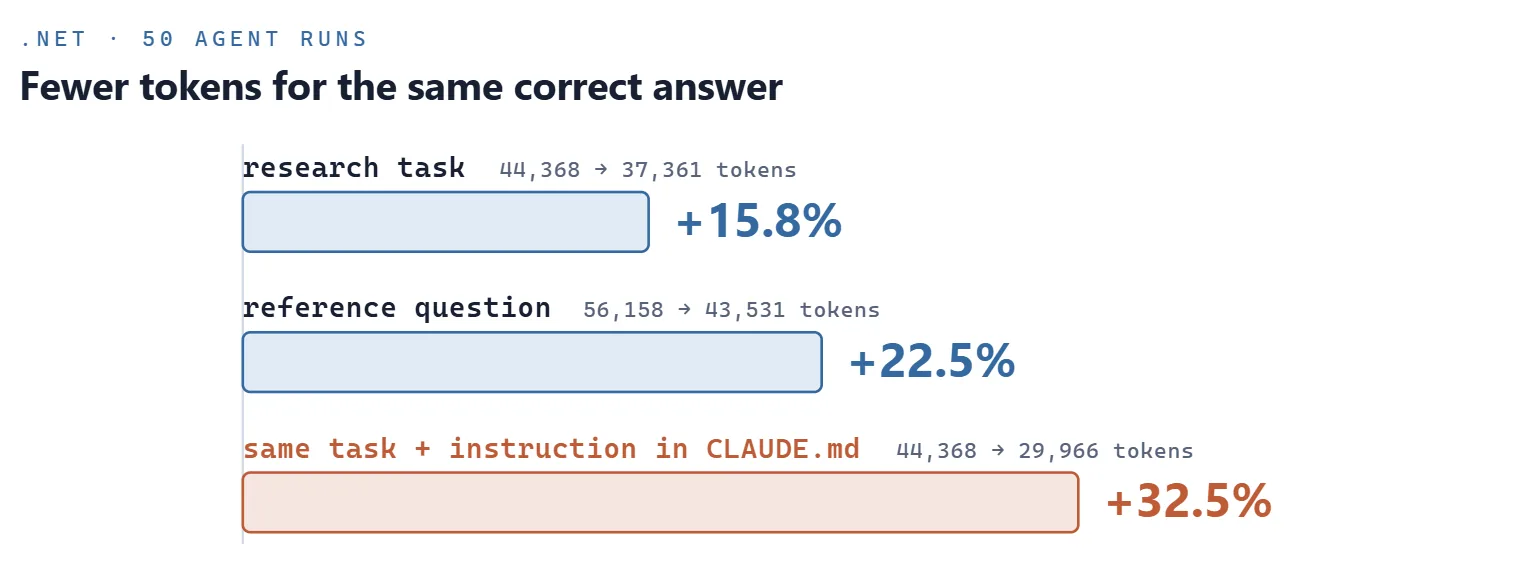
Methodology: a research task and a reference question, 50 independent agent runs.
Token usage went down by about 16-22%, and execution time went down by 30-40%. At the same time the accuracy of the answers did not suffer. LSP and grep solved the tasks equally correctly.
Extra instructions in CLAUDE.md cut token usage even more.
Unfortunately I cannot show my CLAUDE.md notes, because they contain company secrets. In short, they describe where to look for the original source of an API contract (the OpenAPI specification), since searching the compiled type gives you nothing. This is exactly the case where LSP by default can give a worse result than grep, but with the right instruction the problem is solved.
CircleCI benchmark, June 24, 2026 - LSP vs. grep
Let’s look at a very fresh study from CircleCI about how LSP works with Claude Code.
Setup: the Vue.js core repository, ~149K lines of TypeScript. The models are Opus 4.8 and Sonnet 4.6. Three “find all references” tasks with a known ground truth: trigger (11 places), track (20), effect (260). They measured time, cost, tool output tokens and how complete the found references were.
LSP
grep
Total across the six tasks
$1.88
$2.03
Opus 4.8, total
$1.22
$1.26
Sonnet 4.6, total
$0.66
$0.77
Task effect (260 places), Opus
$0.50
$0.62
Task effect, Sonnet
$0.24
$0.29
Sonnet 4.6:
Execution time: went down by ~34% (the same as in my tests).
Tokens: went down by ~33% (the context rots more slowly)
Cost: went down by ~14% (in the actual bill)
Accuracy: LSP did not miss a single time. The LLM on plain grep, in the runs where it was wrong, found 9 references out of 11 for trigger and 249 out of 260 for effect.
Opus 4.8: the difference with grep is not so strong, except for the same drop in token usage of ~30%. Execution time turned out to be even a little bit longer.
According to the results of the study:
Accuracy went up, LSP was more accurate than grep on Sonnet. On Opus both configurations found everything
The money saving is ~7% on average (Sonnet 14%, Opus 3%)
Token usage went down by 30-33% (both models)
Execution time went down by ~34% on Sonnet and went up by about 2% on Opus
LSP can show great results on a weaker model, and on a stronger one it roughly breaks even (not counting the lower token usage). Also do not forget to take care of the places in the code that LSP does not cover (for example XAML bindings in MAUI or API contracts) with an instruction in CLAUDE.md. Then the agent will know that in some situations it is better to use a combination of tools (grep + LSP).
Where LSP will be more effective
As you have already seen, how effective LSP is depends a lot on your environment, and here is my checklist of where it will be the most useful:
Big project / Monolith
Names that often repeat, “Service”, “Handler”, “Item” and so on.
A strongly typed language, for example Java, C#, Go, Rust
Long compilation / heavy CI
A high level of abstraction: interfaces, DI, abstract factories
Which agents already support LSP
Tool
LSP
When
How it works
Kiro CLI (AWS)
Yes
v1.22, December 11, 2025
18 languages out of the box, no setup needed
Claude Code (Anthropic)
Yes
v2.0.74, end of December 2025
The tool is built in, servers are installed as plugins: 11 official ones plus your own through .lsp.json
OpenCode
Yes, but turned off
2025
30+ preinstalled servers with auto-install, turned on with the lsp: true flag
Qwen Code
Experimental
2026
Only under the --experimental-lsp flag
GitHub Copilot CLI
Partly
April 22, 2026
External LSP servers plus C++ in public preview, needs compile_commands.json
OpenAI Codex CLI
No
Only through MCP bridges. The request for native LSP is one of the most upvoted in the repository (issue #8745)
Google (Gemini CLI, Antigravity)
No
Requests #2465 and #6690 are open, Gemini CLI was retired on June 18, 2026
Any agent through MCP
Yes
2025
Serena and similar bridges, 40+ languages, works where there is no native support
How to connect LSP
The setup is very quick, I will show it with C# and Claude Code as an example.
In Claude Code the tool itself is already built in, and the language server is installed separately, one per language.
First we install the server, it is an ordinary dotnet tool:
dotnet tool install --global csharp-ls
Then we turn on the official plugin and reload the plugins:
That’s it, from now on the agent will go to the server on its own. The plugin works on top of csharp-ls, which is Roslyn under the hood, so it understands .NET Core, .NET Framework, and solutions with several projects. For other languages the scheme is the same, only the package and the name of the plugin change, you can see the list through /plugin. If the language you need is not in the marketplace, the server is written by hand in .lsp.json.
Keep in mind that on a big codebase the first run is not instant: the server needs to load the solution and build an index, and only after that do the answers become fast.
Conclusion
LSP is already a powerful tool in agentic development, it can raise accuracy, cut token usage (and the price of use) and also make the agent work faster. Many modern agents already have LSP support, but you need local setup to turn it on.
Whether you should use LSP or not depends on your project, your stack and your model. Its support and development are actively continuing and getting better. So you should definitely pay attention to it.
Thank you for reading the article to the end. I will be glad to hear about your experience with LSP, whether it helped you increase your effectiveness or slowed your agents down instead.
Введение
Ваш агент угадывает. Он сопоставляет имена как текст и надеется, что нужная строка попала в то, что он прочитал. Языковой сервер заменяет угадывание на code intelligence, потому что он разобрал ваш код и знает.
Уже почти год я работаю AI Enablement Lead в продуктовой компании и отвечаю за ресерч и AI adoption среди разработчиков и QA. На нашей кодовой базе LSP срезал расход токенов агента на 16-22%, а время выполнения на 30-40%. Всё дальше опирается на мои собственные тесты и на независимый бенчмарк от CircleCI.
Что такое LSP
LSP (Language Server Protocol) это стандартизированный протокол взаимодействия между редактором кода и сервером, который анализирует исходный код и предоставляет информацию о нём.
До его появления в 2016 году, каждую умную фичу редактора приходилось писать заново под каждый язык. Хочешь нормальный Python в VS Code, кто-то садится и пишет плагин. Хочешь то же самое в Vim, всё начинается с нуля, потому что там другой API. В Emacs опять с нуля. Десять редакторов на двадцать языков, это двести отдельных плагинов, и качество у них очень разное.
LSP убрал эту бессмыслицу одним договором. Команда языка пишет одну программу (pyright для Python, gopls для Go, rust-analyzer для Rust), команда редактора пишет одну обвязку, и дальше все работают со всеми.
Как LSP попал в мир LLM
Первая громкая работа на стыке LSP и LLM появилась в июне 2023 года в Microsoft Research (arXiv 2306.10763).
Тогда AI ещё плохо справлялся с разработкой ПО, и была одна ключевая проблема. Когда LLM печатает код и обращается к объекту, например к экземпляру класса, у неё нет никакого способа узнать, какие методы у этого объекта реально есть, если его определение лежит в соседнем файле. Посмотреть было негде. Модель того времени просто печатала текст слева направо, без инструментов, без возможности что-то найти и открыть. Функции и вызовы инструментов в API появились 13 июня 2023, ровно в том же месяце, что и эта статья, а до первых нормальных агентов оставался ещё почти год.
Ровно в этом месте модель и начинала галлюцинировать, придумывая что-то похожее на правду. Представьте, что у разработчиков забрали IDE с IntelliSense, посадили в Notepad, а остальные файлы проекта закрыли на ключ. И вот вы пишете user. и пытаетесь вспомнить, как там было: username? email? или всё-таки name?
Исследователи стали думать, как решить эту проблему, и пришли к такой идее.
Модель печатает код не словами, а токенами, и на каждом шаге выбирает следующий из списка кандидатов. В тот момент, когда она поставила точку после объекта, генерацию притормаживают и спрашивают у языкового сервера, какие члены у этого объекта есть на самом деле. Полученный список уходит не в модель, а в обвязку вокруг неё, и та просто вычёркивает из кандидатов все имена, которых в проекте не существует. Модель выбирает уже из того, что осталось, поэтому напечатать несуществующий метод она физически не может.
Такой подход назвали Monitor-Guided Decoding. На Java compilation rate вырос на 19-25%, и переобучать модель при этом не пришлось.
Это первая громкая работа, где языковой сервер не просто подкладывает модели контекст, а ограничивает её. И побочный продукт оказался важнее самого эксперимента: чтобы дёргать серверы из Python, авторы написали библиотеку multilspy. Именно из неё потом выросла solid-lsp, внутри Serena, которая является самым популярным LSP-инструментом для агентов (27 тысяч звёзд на момент написания). Так что цепочка прямая: ресерч 2023 года дал библиотеку, библиотека дала агентский тулинг 2025-2026.
Принцип работы
По умолчанию LLM работает с вашим кодом как с plain text и не может делать даже базовый «go to definition». Чтобы агент нашёл определение объекта, ему нужно использовать plain text search и с помощью инструмента grep собирать нужную информацию.
Современные модели делают это уже достаточно качественно и не перегружают контекст. Например, Opus 5 при поиске определения какого-то объекта не читает сразу весь файл, а находит лишь то, что ему нужно. Но если проект большой и зависимости сложные, на это может потребоваться больше токенов, больше времени, а в некоторых ситуациях это может приводить и к ошибкам.
LSP в свою очередь даёт агенту доступ к языковому серверу, за которым стоит семантическая модель проекта, и LLM получает большое количество инструментов для более гибкой и точной навигации по коду. Особенно это заметно на более слабых моделях (исследование ниже это подтвердит).
LSP не заменяет grep, он только расширяет возможности LLM.
Почему про LSP так мало говорят
Несмотря на то что первое использование LSP в связке с LLM было в 2023 году, нативный LSP у крупных агентов существует только с декабря 2025 года (Claude Code и Kiro CLI). С того времени прошло всего полгода, и из-за этого у него нет больших независимых исследований и бенчмарков. Подход ещё совсем новый, и всё внимание занимают другие трендовые направления, как агентская разработка и context engineering.
На мой взгляд, LSP уже имеет большой потенциал, и в ближайшие годы мы увидим его становление как одного из главных стержней агентской разработки.
Интересный факт: MCP, который уже везде применяется, на этапах разработки был вдохновлён LSP.
MCP частично вдохновлён Language Server Protocol, который стандартизирует то, как поддержка языков программирования добавляется в целую экосистему инструментов разработки. Схожим образом MCP стандартизирует то, как дополнительный контекст и инструменты интегрируются в экосистему AI-приложений. Источник
Преимущества
Помимо упомянутого выше «go to definition», LSP предоставляет также такие инструменты:
Диагностика - языковой сервер сам возвращает ошибки и предупреждения после каждого edit: типы, отсутствующие импорты, синтаксис. Компилятор или линтер запускать не нужно. Для агента это важно. Если он сам внёс ошибку, он видит её в том же ходу и чинит, не дожидаясь пользователя или CI. Для больших проектов и сложных задач это даёт большой прирост производительности, поскольку билд может занимать ~10-15 минут.
Find all references - все использования символа. textDocument/references. Grep по имени даст совпадения в комментариях, строках, в одноимённых полях чужих классов и промахнётся на реэкспортах и алиасах. LSP отдаёт ровно те места, которые компилятор считает ссылками на этот символ. Это ключевая операция для «что сломается, если я это изменю».
Document symbols - оглавление файла: классы, методы, поля, их вложенность и границы. textDocument/documentSymbol. Дешёвая замена чтению файла целиком.
Call hierarchy - цепочки вызовов в обе стороны: кто вызывает эту функцию (incoming) и кого вызывает она (outgoing). callHierarchy/incomingCalls / outgoingCalls. Это трассировка на несколько уровней вглубь за один вызов. Руками агент собирал бы её десятком grep-ов, теряя ветки на колбэках и виртуальных диспатчах.
Hover / type info в позиции - фактический тип выражения в конкретной точке. textDocument/hover. Незаменимо там, где тип выведен, а не написан: var, дженерики, цепочки LINQ, возврат фабрики. Grep физически не может ответить на этот вопрос.
Если вы занимались мобильной разработкой и понимаете, как долго может собираться проект (компиляция стилей и views, bindings, translation resources), вы поймёте, почему диагностика это одна из тех вещей, за что я люблю Language Server Protocol. Она позволяет агенту сразу найти ошибку, а не ждать очередной build.
И это не весь список features. Но доступность может варьироваться в зависимости от языка и окружения. Поэтому всегда изучайте документацию перед использованием.
Недостатки
Конечно же, LSP не исправляет всё, и это не решение всех проблем. У него существуют также определённые минусы в использовании. Давайте взглянем на них подробнее.
Основной недостаток, о котором вы должны знать, в том, что в некоторых ситуациях поиск может быть неполным. LSP отвечает только за то, что видит компилятор, в пределах одного языка и одного проекта. Поэтому мимо него проходит всё, где имя вашего класса или метода живёт строкой: создание типа по имени через рефлексию, имена классов в конфигах и настройках логгера, таблицы и колонки в сыром SQL и хранимых процедурах, строковые роуты, которые дёргает фронтенд. Всё это живёт возле кода, но прямой ссылкой на символ не является.
В таких случаях агент может спросить LSP, найти 12 мест и не обнаружить ещё 5, которые grep нашёл бы. При этом он не знает, что что-то пропустил, поскольку ответ был чистым (и хеджирование с помощью grep в этом случае может не сработать).
В случае с grep ситуация была бы такая: 40 совпадений с шумом, агент их просматривает и решает по каждому. Медленнее, дороже, но точно.
В этот момент вы можете подумать: «Я лучше подожду, заплачу немного дороже, но grep справится со всем, и я получу лучший результат». Однако grep ошибается чаще и случайно.
Агент может с помощью grep найти 800 совпадений, прочитать 30, а остальное отбросить по лимиту контекста, а не по смыслу.
Во время моих тестов LSP и grep показали одинаковую точность результатов, то есть главное опасение не подтвердилось. Независимое исследование от CircleCI, наоборот, выявило, что LSP был точнее в результатах, чем grep (ниже будет подробнее).
Мой опыт с Language Server Protocol
Впервые я попробовал подключить LSP к Claude Code в январе 2026, спустя месяц после появления официальной поддержки. Тогда он работал медленно, неэффективно и даже зависал время от времени. Обычно он вис на самой первой индексации проекта, который большой и имеет большое количество зависимостей. С того времени прошло полгода, большое количество багов было исправлено, и я решил дать ему второй шанс.
Сразу хочу предупредить, что эффективность использования LSP зависит от многих вещей: ваша модель, effort модели, язык программирования, контекст задачи, размер проекта и тому подобные вещи. Также поддержка протокола до сих пор находится в активной разработке, и вещи могут меняться.
Я провёл небольшое исследование, где LSP показал хорошие результаты.
Сетап:
Продукт: огромная кодовая база (около 20 solutions и 100 проектов)
Внешние зависимости: NuGet пакеты, .dll библиотеки на C++, API спецификации
Язык: C# / .NET 10
Модель: Opus 5 / Effort: Max
Методология: research задача и reference question, 50 независимых агентских запусков.
Расход токенов снизился примерно на 16-22%, а время выполнения сократилось на 30-40%. При этом точность ответов не пострадала. LSP и grep решили задачи одинаково правильно.
Дополнительные инструкции в CLAUDE.md срезали расход токенов ещё сильнее.
К сожалению, я не могу показать мои записи CLAUDE.md, поскольку они содержат корпоративную тайну. В двух словах, там описывается, где искать первоисточник API контракта (OpenAPI спецификация), поскольку скомпилированный тип искать бесполезно. Это как раз именно тот случай, где LSP по умолчанию может показать результат хуже, чем grep, но с правильной инструкцией эта проблема решается.
Бенчмарк от CircleCI, 24 июня 2026 - LSP против grep
Давайте рассмотрим совсем свежее исследование от CircleCI о том, как LSP работает с Claude Code.
Сетап: репозиторий Vue.js core, ~149K строк TypeScript. Модели Opus 4.8 и Sonnet 4.6. Три задачи «найди все ссылки» с известным ground truth: trigger (11 мест), track (20), effect (260). Мерили время, стоимость, токены вывода инструментов и полноту найденных ссылок.
LSP
grep
Всего по шести задачам
$1.88
$2.03
Opus 4.8, суммарно
$1.22
$1.26
Sonnet 4.6, суммарно
$0.66
$0.77
Задача effect (260 мест), Opus
$0.50
$0.62
Задача effect, Sonnet
$0.24
$0.29
Sonnet 4.6:
Время выполнения: снизилось на ~34% (аналогично с моими тестами).
Токены: снизились на ~33% (контекст гниёт медленнее)
Цена: снизилась на ~14% (в реальном счёте)
Точность: LSP не промахнулся ни разу. LLM на голом grep в ошибочных прогонах находил 9 ссылок из 11 на trigger и 249 из 260 на effect.
Opus 4.8: различие с grep не такое сильное, кроме того же снижения потребления токенов на ~30%. Время выполнения оказалось даже немного больше.
По результатам исследования:
Точность возросла, LSP был точнее grep на Sonnet. На Opus обе конфигурации нашли всё
Экономия по деньгам в среднем ~7% (Sonnet 14%, Opus 3%)
Потребление токенов снизилось на 30-33% (обе модели)
Время выполнения снизилось на ~34% на Sonnet и выросло примерно на 2% на Opus
LSP может показывать отличные результаты на более слабой модели, а на сильной выходит примерно в ноль (не считая меньшего расхода токенов). Не забудьте также позаботиться о местах в коде, которые не покрываются LSP (например XAML bindings в MAUI или API контракты), с помощью инструкции в CLAUDE.md. Тогда агент будет знать, что в некоторых ситуациях лучше использовать комбинацию инструментов (grep + LSP).
Где LSP покажет большую эффективность
Как вы уже смогли увидеть, эффективность LSP сильно зависит от вашего environment, и вот мой чеклист, где он будет наиболее полезен:
Большой проект / Монолит
Частое совпадение имён, «Service», «Handler», «Item» и так далее.
Строго типизированный язык, например Java, C#, Go, Rust
Долгая компиляция / тяжёлый CI
Высокий уровень абстракции: интерфейсы, DI, абстрактные фабрики
Какие агенты уже поддерживают LSP
Инструмент
LSP
Когда
Как это работает
Kiro CLI (AWS)
Есть
v1.22, 11 декабря 2025
18 языков из коробки, настройка не нужна
Claude Code (Anthropic)
Есть
v2.0.74, конец декабря 2025
Инструмент встроен, серверы ставятся плагинами: 11 официальных плюс свои через .lsp.json
OpenCode
Есть, но выключен
2025
30+ предустановленных серверов с автоустановкой, включается флагом lsp: true
Qwen Code
Экспериментально
2026
Только под флагом --experimental-lsp
GitHub Copilot CLI
Частично
22 апреля 2026
Внешние LSP-серверы плюс C++ в public preview, нужен compile_commands.json
OpenAI Codex CLI
Нет
Только через MCP-мосты. Запрос на нативный LSP один из самых залайканных в репозитории (issue #8745)
Google (Gemini CLI, Antigravity)
Нет
Запросы #2465 и #6690 открыты, Gemini CLI выведен из эксплуатации 18 июня 2026
Любой агент через MCP
Есть
2025
Serena и подобные мосты, 40+ языков, работает там, где нативной поддержки нет
Как подключить LSP
Настройка очень быстрая, покажу на примере языка C# и Claude Code.
В Claude Code сам инструмент уже встроен, а языковой сервер ставится отдельно, по одному на язык.
Сначала ставим сервер, это обычный dotnet tool:
dotnet tool install --global csharp-ls
Потом включаем официальный плагин и перезагружаем плагины:
Всё, дальше агент начнёт ходить в сервер сам. Плагин работает поверх csharp-ls, это Roslyn под капотом, так что понимает и .NET Core, и .NET Framework, и решения из нескольких проектов. Для других языков схема та же, меняется только пакет и название плагина, список смотрите через /plugin. Если нужного языка в маркетплейсе нет, сервер прописывается вручную в .lsp.json.
Учтите, что на большой кодовой базе первый запуск не мгновенный: серверу нужно поднять решение и построить индекс, и только после этого ответы становятся быстрыми.
Итог
LSP уже сейчас является мощным инструментом в агентской разработке, он может повысить точность, снизить расход токенов (и цену использования), а также ускорить работу агента. Многие современные агенты уже имеют поддержку LSP, но для её включения нужна локальная настройка.
Стоит ли использовать LSP или нет, зависит от вашего проекта, стека и модели. Его поддержка и развитие активно продолжаются и становятся лучше. Поэтому вам определённо стоит обратить на него внимание.
Спасибо, что прочитали статью до конца. С радостью услышу ваш опыт с LSP, помог ли он вам увеличить эффективность или же наоборот замедлил агентов.
Einleitung
Ihr Agent rät. Er vergleicht Namen als Text und hofft, dass die richtige Zeile in dem stand, was er gelesen hat. Ein Language Server ersetzt das Raten durch Code Intelligence, denn er hat Ihren Code geparst und weiß es.
Seit fast einem Jahr arbeite ich als AI Enablement Lead in einem Produktunternehmen und bin für Research und AI Adoption bei Software-Entwicklern und QA verantwortlich. In unserer Codebase hat LSP den Token-Verbrauch des Agenten um 16-22% und die Ausführungszeit um 30-40% gesenkt. Alles Weitere beruht auf meinen eigenen Tests und auf einem unabhängigen Benchmark von CircleCI.
Was LSP ist
LSP (Language Server Protocol) ist ein standardisiertes Protokoll für die Kommunikation zwischen einem Code-Editor und einem Server, der den Quellcode analysiert und Informationen darüber liefert.
Bevor es 2016 erschien, musste jedes intelligente Editor-Feature für jede Sprache neu geschrieben werden. Sie wollen ordentliches Python in VS Code, also setzt sich jemand hin und schreibt ein Plugin. Sie wollen dasselbe in Vim, alles beginnt von vorne, weil die API dort anders ist. In Emacs wieder von vorne. Zehn Editoren für zwanzig Sprachen, das sind zweihundert einzelne Plugins, und ihre Qualität ist sehr unterschiedlich.
LSP hat diesen Unsinn mit einer einzigen Vereinbarung beseitigt. Das Sprachteam schreibt ein Programm (pyright für Python, gopls für Go, rust-analyzer für Rust), das Editor-Team schreibt einen Wrapper, und danach funktioniert alles mit allem.
Wie LSP in die LLM-Welt kam
Die erste bekannte Arbeit an der Schnittstelle von LSP und LLM erschien im Juni 2023 bei Microsoft Research (arXiv 2306.10763).
Damals war AI in der Softwareentwicklung noch schwach, und es gab ein zentrales Problem. Wenn ein LLM Code schreibt und auf ein Objekt zugreift, zum Beispiel auf eine Instanz einer Klasse, hat es überhaupt keine Möglichkeit herauszufinden, welche Methoden dieses Objekt wirklich hat, wenn seine Definition in einer Nachbardatei liegt. Es gab nichts, wo man nachsehen konnte. Das Modell jener Zeit tippte den Text einfach von links nach rechts, ohne Tools, ohne die Möglichkeit, etwas zu finden und zu öffnen. Functions und Tool Calls kamen am 13. Juni 2023 in die API, genau im selben Monat wie diese Arbeit, und bis zu den ersten richtigen Agents war es noch fast ein Jahr.
Genau an dieser Stelle begann das Modell zu halluzinieren und erfand etwas, das wie die Wahrheit aussieht. Stellen Sie sich vor, man nimmt Entwicklern die IDE mit IntelliSense weg, setzt sie in Notepad und schließt die übrigen Projektdateien weg. Und da tippen Sie user. und versuchen sich zu erinnern, wie es war: username? email? oder doch name?
Die Forscher begannen darüber nachzudenken, wie sich dieses Problem lösen lässt, und kamen auf diese Idee.
Das Modell tippt Code nicht in Wörtern, sondern in Tokens, und wählt bei jedem Schritt das nächste aus einer Liste von Kandidaten. In dem Moment, in dem es einen Punkt nach dem Objekt setzt, wird die Generierung angehalten und der Language Server gefragt, welche Members dieses Objekt wirklich hat. Die Liste, die zurückkommt, geht nicht in das Modell, sondern in den Wrapper darum, und der Wrapper streicht aus den Kandidaten einfach alle Namen, die es im Projekt nicht gibt. Das Modell wählt dann aus dem, was übrig bleibt, und kann eine nicht existierende Methode deshalb physisch nicht tippen.
Dieser Ansatz wurde Monitor-Guided Decoding genannt. In Java stieg die Compilation Rate um 19-25%, und das Modell musste dafür nicht neu trainiert werden.
Das ist die erste bekannte Arbeit, in der der Language Server dem Modell nicht nur Kontext zuschiebt, sondern es begrenzt. Und das Nebenprodukt erwies sich als wichtiger als das Experiment selbst: um die Server aus Python aufzurufen, schrieben die Autoren die Bibliothek multilspy. Genau daraus wuchs später solid-lsp, innerhalb von Serena, das das populärste LSP-Tool für Agents ist (27 Tausend Stars zum Zeitpunkt des Schreibens). Die Kette ist also direkt: Research aus 2023 gab eine Bibliothek, die Bibliothek gab das Agent-Tooling von 2025-2026.
Wie es funktioniert
Standardmäßig arbeitet ein LLM mit Ihrem Code als Plain Text und kann nicht einmal ein einfaches „go to definition” ausführen. Damit der Agent die Definition eines Objekts findet, muss er Plain-Text-Suche verwenden und die nötigen Informationen mit dem Tool grep zusammentragen.
Moderne Modelle machen das schon gut genug und überladen den Kontext nicht. Opus 5 zum Beispiel liest bei der Suche nach der Definition eines Objekts nicht sofort die ganze Datei, sondern findet nur das, was es braucht. Aber wenn das Projekt groß und die Abhängigkeiten komplex sind, kann das mehr Tokens und mehr Zeit kosten, und in manchen Situationen kann es auch zu Fehlern führen.
LSP wiederum gibt dem Agenten Zugriff auf den Language Server, hinter dem ein semantisches Modell des Projekts steht, und das LLM erhält eine große Anzahl von Tools für flexiblere und präzisere Navigation durch den Code. Besonders deutlich ist das bei schwächeren Modellen (die Studie weiter unten wird das bestätigen).
LSP ersetzt grep nicht, es erweitert nur, was das LLM kann.
Warum so wenige über LSP sprechen
Obwohl LSP zusammen mit einem LLM erstmals 2023 eingesetzt wurde, gibt es natives LSP in den großen Agents erst seit Dezember 2025 (Claude Code und Kiro CLI). Seitdem ist nur ein halbes Jahr vergangen, und deshalb gibt es dazu keine großen unabhängigen Studien und Benchmarks. Der Ansatz ist noch ganz neu, und die ganze Aufmerksamkeit geht an andere Trendthemen wie Agentic Development und Context Engineering.
Meiner Meinung nach hat LSP schon großes Potenzial, und in den nächsten Jahren werden wir sehen, wie es zu einer der Hauptsäulen der agentischen Entwicklung wird.
Interessante Tatsache: MCP, das schon überall verwendet wird, wurde während seiner Entwicklung von LSP inspiriert.
MCP übernimmt einige Ideen vom Language Server Protocol, das standardisiert, wie Unterstützung für Programmiersprachen zu einem ganzen Ökosystem von Entwicklungswerkzeugen hinzugefügt wird. In ähnlicher Weise standardisiert MCP, wie zusätzlicher Kontext und Tools in das Ökosystem von AI-Anwendungen integriert werden. Quelle
Vorteile
Neben dem oben erwähnten „go to definition” bietet LSP auch solche Tools:
Diagnostics - der Language Server gibt nach jedem Edit selbst Fehler und Warnungen zurück: Typen, fehlende Imports, Syntax. Einen Compiler oder Linter muss man nicht starten. Für einen Agenten ist das wichtig. Wenn er selbst einen Fehler eingebaut hat, sieht er ihn im selben Zug und behebt ihn, ohne auf den Nutzer oder auf CI zu warten. Bei großen Projekten und komplexen Aufgaben bringt das einen großen Produktivitätsgewinn, denn ein Build kann ~10-15 Minuten dauern.
Find all references - alle Verwendungen eines Symbols. textDocument/references. Ein grep nach dem Namen gibt Ihnen Treffer in Kommentaren, in Strings, in gleichnamigen Feldern anderer Klassen, und es verpasst Re-Exports und Aliase. LSP gibt genau die Stellen zurück, die der Compiler als Referenzen auf dieses Symbol zählt. Das ist die zentrale Operation für „was bricht, wenn ich das ändere”.
Document symbols - das Inhaltsverzeichnis einer Datei: Klassen, Methoden, Felder, ihre Verschachtelung und ihre Grenzen. textDocument/documentSymbol. Ein billiger Ersatz dafür, die ganze Datei zu lesen.
Call hierarchy - Aufrufketten in beide Richtungen: wer diese Funktion aufruft (incoming) und wen sie aufruft (outgoing). callHierarchy/incomingCalls / outgoingCalls. Das ist ein Trace über mehrere Ebenen in einem Aufruf. Von Hand würde der Agent ihn mit einem Dutzend greps zusammenbauen und dabei Zweige an Callbacks und virtuellen Dispatches verlieren.
Hover / Type-Info an einer Position - der tatsächliche Typ eines Ausdrucks an einer konkreten Stelle. textDocument/hover. Unersetzlich dort, wo der Typ inferiert und nicht geschrieben ist: var, Generics, LINQ-Ketten, der Return einer Factory. Grep kann diese Frage physisch nicht beantworten.
Wenn Sie in der Mobile-Entwicklung gearbeitet haben und wissen, wie lange ein Projekt bauen kann (Kompilieren von Styles und Views, Bindings, Translation Resources), verstehen Sie, warum Diagnostics eines der Dinge ist, die ich am Language Server Protocol liebe. Sie lässt den Agenten den Fehler sofort finden, statt auf den nächsten Build zu warten.
Und das ist nicht die vollständige Liste der Features. Aber die Verfügbarkeit kann je nach Sprache und Umgebung variieren. Lesen Sie also immer die Dokumentation, bevor Sie es einsetzen.
Nachteile
Natürlich behebt LSP nicht alles, und es ist keine Lösung für jedes Problem. Es hat auch bestimmte Nachteile im Einsatz. Schauen wir sie uns genauer an.
Der wichtigste Nachteil, den Sie kennen sollten, ist, dass die Suche in manchen Situationen unvollständig sein kann. LSP ist nur für das zuständig, was der Compiler sieht, innerhalb einer Sprache und eines Projekts. Deshalb geht alles an ihm vorbei, wo der Name Ihrer Klasse oder Methode als String lebt: das Erzeugen eines Typs über den Namen per Reflection, Klassennamen in Configs und in Logger-Einstellungen, Tabellen und Spalten in rohem SQL und Stored Procedures, String-Routen, die das Frontend aufruft. All das lebt neben dem Code, ist aber keine direkte Referenz auf ein Symbol.
In solchen Fällen kann der Agent LSP fragen, 12 Stellen finden und weitere 5 nicht finden, die grep gefunden hätte. Dabei weiß er nicht, dass er etwas verpasst hat, weil die Antwort sauber war (und Hedging mit grep funktioniert in diesem Fall möglicherweise nicht).
Mit grep wäre die Situation so: 40 Treffer mit Rauschen, der Agent geht sie durch und entscheidet bei jedem einzelnen. Langsamer, teurer, aber genau.
An dieser Stelle denken Sie vielleicht: „Ich warte lieber und zahle etwas mehr, aber grep schafft alles und ich bekomme das bessere Ergebnis”. Allerdings irrt sich grep häufiger, und es tut das zufällig.
Mit grep kann der Agent 800 Treffer finden, 30 davon lesen und den Rest wegen des Kontextlimits verwerfen, nicht wegen ihrer Bedeutung.
Bei meinen Tests zeigten LSP und grep die gleiche Genauigkeit der Ergebnisse, die zentrale Befürchtung hat sich also nicht bestätigt. Die unabhängige Studie von CircleCI stellte im Gegenteil fest, dass LSP in seinen Ergebnissen genauer war als grep (weiter unten mehr dazu).
Meine Erfahrung mit dem Language Server Protocol
Zum ersten Mal versuchte ich LSP im Januar 2026 an Claude Code anzubinden, einen Monat nachdem die offizielle Unterstützung erschien. Damals arbeitete es langsam, nicht effizient, und es fror von Zeit zu Zeit sogar ein. Meist hing es bei der allerersten Indizierung des Projekts, das groß ist und viele Abhängigkeiten hat. Seitdem ist ein halbes Jahr vergangen, eine große Anzahl von Bugs wurde behoben, und ich beschloss, ihm eine zweite Chance zu geben.
Ich möchte gleich vorweg warnen, dass die Effektivität von LSP von vielen Dingen abhängt: von Ihrem Modell, vom Effort des Modells, von der Programmiersprache, vom Kontext der Aufgabe, von der Größe des Projekts und ähnlichen Dingen. Außerdem ist die Unterstützung des Protokolls immer noch in aktiver Entwicklung und Dinge können sich ändern.
Ich habe eine kleine Studie durchgeführt, in der LSP gute Ergebnisse zeigte.
Setup:
Produkt: eine riesige Codebase (etwa 20 Solutions und 100 Projekte)
Externe Abhängigkeiten: NuGet-Packages, .dll-Bibliotheken in C++, API-Spezifikationen
Sprache: C# / .NET 10
Modell: Opus 5 / Effort: Max
Methodik: eine Research-Aufgabe und eine Reference Question, 50 unabhängige Agent-Läufe.
Der Token-Verbrauch sank um etwa 16-22%, und die Ausführungszeit sank um 30-40%. Dabei hat die Genauigkeit der Antworten nicht gelitten. LSP und grep lösten die Aufgaben gleich richtig.
Zusätzliche Anweisungen in CLAUDE.md senkten den Token-Verbrauch noch stärker.
Leider kann ich meine CLAUDE.md-Notizen nicht zeigen, weil sie Firmengeheimnisse enthalten. Kurz gesagt beschreiben sie, wo die Originalquelle eines API-Vertrags zu finden ist (die OpenAPI-Spezifikation), da die Suche im kompilierten Typ nichts bringt. Das ist genau der Fall, in dem LSP standardmäßig ein schlechteres Ergebnis liefern kann als grep, mit der richtigen Anweisung ist das Problem aber gelöst.
CircleCI-Benchmark, 24. Juni 2026 - LSP vs. grep
Schauen wir uns eine ganz frische Studie von CircleCI dazu an, wie LSP mit Claude Code funktioniert.
Setup: das Repository Vue.js core, ~149K Zeilen TypeScript. Die Modelle sind Opus 4.8 und Sonnet 4.6. Drei Aufgaben „finde alle Referenzen” mit bekannter Ground Truth: trigger (11 Stellen), track (20), effect (260). Gemessen wurden Zeit, Kosten, Tool-Output-Tokens und die Vollständigkeit der gefundenen Referenzen.
LSP
grep
Gesamt über die sechs Aufgaben
$1.88
$2.03
Opus 4.8, gesamt
$1.22
$1.26
Sonnet 4.6, gesamt
$0.66
$0.77
Aufgabe effect (260 Stellen), Opus
$0.50
$0.62
Aufgabe effect, Sonnet
$0.24
$0.29
Sonnet 4.6:
Ausführungszeit: sank um ~34% (genauso wie in meinen Tests).
Tokens: sanken um ~33% (der Kontext verrottet langsamer)
Kosten: sanken um ~14% (auf der tatsächlichen Rechnung)
Genauigkeit: LSP lag kein einziges Mal daneben. Das LLM mit reinem grep fand in den fehlerhaften Läufen 9 von 11 Referenzen für trigger und 249 von 260 für effect.
Opus 4.8: der Unterschied zu grep ist nicht so stark, abgesehen vom gleichen Rückgang des Token-Verbrauchs um ~30%. Die Ausführungszeit war sogar etwas länger.
Nach den Ergebnissen der Studie:
Die Genauigkeit stieg, LSP war auf Sonnet genauer als grep. Auf Opus fanden beide Konfigurationen alles
Die Einsparung beim Geld liegt im Schnitt bei ~7% (Sonnet 14%, Opus 3%)
Der Token-Verbrauch sank um 30-33% (beide Modelle)
Die Ausführungszeit sank auf Sonnet um ~34% und stieg auf Opus um etwa 2%
LSP kann auf einem schwächeren Modell sehr gute Ergebnisse zeigen, und auf einem starken Modell hält es sich etwa die Waage (den geringeren Token-Verbrauch nicht mitgerechnet). Vergessen Sie außerdem nicht, sich mit einer Anweisung in CLAUDE.md um die Stellen im Code zu kümmern, die LSP nicht abdeckt (zum Beispiel XAML-Bindings in MAUI oder API-Verträge). Dann weiß der Agent, dass in manchen Situationen eine Kombination der Werkzeuge besser ist (grep + LSP).
Wo LSP mehr Wirkung zeigt
Wie Sie schon gesehen haben, hängt die Effektivität von LSP stark von Ihrem Environment ab, und hier ist meine Checkliste, wo es am nützlichsten ist:
Großes Projekt / Monolith
Namen, die sich oft wiederholen, „Service”, „Handler”, „Item” und so weiter.
Eine stark typisierte Sprache, zum Beispiel Java, C#, Go, Rust
Lange Kompilierung / schweres CI
Ein hoher Abstraktionsgrad: Interfaces, DI, abstrakte Factories
Welche Agents LSP schon unterstützen
Tool
LSP
Wann
Wie es funktioniert
Kiro CLI (AWS)
Ja
v1.22, 11. Dezember 2025
18 Sprachen out of the box, keine Einrichtung nötig
Claude Code (Anthropic)
Ja
v2.0.74, Ende Dezember 2025
Das Tool ist eingebaut, Server werden als Plugins installiert: 11 offizielle plus eigene über .lsp.json
OpenCode
Ja, aber ausgeschaltet
2025
30+ vorinstallierte Server mit Auto-Installation, wird mit dem Flag lsp: true eingeschaltet
Qwen Code
Experimentell
2026
Nur unter dem Flag --experimental-lsp
GitHub Copilot CLI
Teilweise
22. April 2026
Externe LSP-Server plus C++ in der Public Preview, braucht compile_commands.json
OpenAI Codex CLI
Nein
Nur über MCP-Bridges. Der Request für natives LSP ist einer der am häufigsten gelikten im Repository (Issue #8745)
Google (Gemini CLI, Antigravity)
Nein
Die Requests #2465 und #6690 sind offen, Gemini CLI wurde am 18. Juni 2026 abgeschaltet
Jeder Agent über MCP
Ja
2025
Serena und ähnliche Bridges, 40+ Sprachen, funktioniert dort, wo es keine native Unterstützung gibt
Wie man LSP anbindet
Die Einrichtung geht sehr schnell, ich zeige es am Beispiel von C# und Claude Code.
In Claude Code ist das Tool selbst schon eingebaut, und der Language Server wird separat installiert, einer pro Sprache.
Zuerst installieren wir den Server, das ist ein ganz normales dotnet tool:
dotnet tool install --global csharp-ls
Dann schalten wir das offizielle Plugin ein und laden die Plugins neu:
Das war es, ab jetzt geht der Agent von selbst zum Server. Das Plugin arbeitet auf csharp-ls, das ist Roslyn unter der Haube, also versteht es .NET Core, .NET Framework und Solutions aus mehreren Projekten. Für andere Sprachen ist das Schema dasselbe, es ändern sich nur das Package und der Name des Plugins, die Liste sehen Sie über /plugin. Wenn die Sprache, die Sie brauchen, nicht im Marketplace ist, wird der Server von Hand in .lsp.json eingetragen.
Beachten Sie, dass der erste Lauf bei einer großen Codebase nicht sofort geht: der Server muss die Solution laden und einen Index bauen, und erst danach werden die Antworten schnell.
Fazit
LSP ist schon jetzt ein mächtiges Werkzeug in der agentischen Entwicklung, es kann die Genauigkeit erhöhen, den Token-Verbrauch senken (und den Preis der Nutzung) und außerdem den Agenten schneller machen. Viele moderne Agents haben bereits LSP-Unterstützung, aber Sie brauchen lokale Einrichtung, um es einzuschalten.
Ob Sie LSP einsetzen sollten oder nicht, hängt von Ihrem Projekt, Ihrem Stack und Ihrem Modell ab. Seine Unterstützung und Entwicklung gehen aktiv weiter und werden besser. Deshalb sollten Sie ihm auf jeden Fall Aufmerksamkeit schenken.
Danke, dass Sie den Artikel bis zum Ende gelesen haben. Ich höre gerne von Ihrer Erfahrung mit LSP, ob es Ihnen geholfen hat, effektiver zu werden, oder ob es Ihre Agents stattdessen ausgebremst hat.
Introduction
Votre agent devine. Il fait correspondre des noms comme du texte et espère que la bonne ligne était dans ce qu’il a lu. Un language server remplace cette devinette par du code intelligence, parce qu’il a parsé votre code et il sait.
Depuis presque un an je travaille comme AI Enablement Lead dans une entreprise produit, et je suis responsable du research et de l’AI adoption chez les développeurs et le QA. Sur notre codebase, LSP a réduit la consommation de tokens de l’agent de 16-22% et son temps d’exécution de 30-40%. Tout ce qui suit repose sur mes propres tests et sur un benchmark indépendant de CircleCI.
Ce qu’est LSP
LSP (Language Server Protocol) est un protocole standardisé de communication entre un éditeur de code et un serveur qui analyse le code source et fournit des informations à son sujet.
Avant son apparition en 2016, chaque fonctionnalité intelligente d’un éditeur devait être réécrite pour chaque langage. Vous voulez du Python correct dans VS Code, quelqu’un s’assoit et écrit un plugin. Vous voulez la même chose dans Vim, tout repart de zéro, parce que l’API y est différente. Dans Emacs, encore une fois de zéro. Dix éditeurs pour vingt langages, cela fait deux cents plugins distincts, et leur qualité est très inégale.
LSP a supprimé cette absurdité avec un seul accord. L’équipe du langage écrit un seul programme (pyright pour Python, gopls pour Go, rust-analyzer pour Rust), l’équipe de l’éditeur écrit un seul wrapper, et ensuite tout fonctionne avec tout.
Comment LSP est arrivé dans le monde des LLM
Le premier travail connu à l’intersection de LSP et des LLM est paru en juin 2023 chez Microsoft Research (arXiv 2306.10763).
À l’époque, l’AI était encore mauvaise en développement logiciel, et il y avait un problème clé. Quand un LLM écrit du code et accède à un objet, par exemple à une instance de classe, il n’a aucun moyen de savoir quelles méthodes cet objet possède réellement, si sa définition se trouve dans un fichier voisin. Il n’y avait nulle part où regarder. Le modèle de cette époque tapait simplement le texte de gauche à droite, sans outils, sans possibilité de trouver quelque chose et de l’ouvrir. Les functions et les appels d’outils sont arrivés dans l’API le 13 juin 2023, exactement le même mois que ce travail, et il restait encore presque un an avant les premiers vrais agents.
C’est exactement à cet endroit que le modèle commençait à halluciner, en inventant quelque chose qui ressemble à la vérité. Imaginez qu’on retire aux développeurs leur IDE avec IntelliSense, qu’on les mette dans Notepad et qu’on ferme à clé le reste des fichiers du projet. Et vous voilà à taper user. en essayant de vous rappeler comment c’était : username ? email ? ou plutôt name ?
Les chercheurs ont commencé à réfléchir à la façon de résoudre ce problème, et ils sont arrivés à cette idée.
Le modèle écrit du code non pas en mots, mais en tokens, et à chaque étape il choisit le suivant dans une liste de candidats. Au moment où il place un point après l’objet, la génération est mise en pause et on demande au language server quels members cet objet possède vraiment. La liste qui revient ne va pas dans le modèle, elle va dans le wrapper autour de lui, et le wrapper raye simplement des candidats tous les noms qui n’existent pas dans le projet. Le modèle choisit alors dans ce qui reste, donc il ne peut physiquement pas écrire une méthode qui n’existe pas.
Cette approche a été appelée Monitor-Guided Decoding. En Java, le compilation rate a augmenté de 19-25%, et il n’a pas été nécessaire de réentraîner le modèle pour cela.
C’est le premier travail connu où le language server ne se contente pas de fournir du contexte au modèle, mais le limite. Et le produit secondaire s’est révélé plus important que l’expérience elle-même : pour appeler les serveurs depuis Python, les auteurs ont écrit la bibliothèque multilspy. C’est exactement de là qu’est ensuite née solid-lsp, à l’intérieur de Serena, qui est l’outil LSP le plus populaire pour les agents (27 mille stars au moment de l’écriture). La chaîne est donc directe : le research de 2023 a donné une bibliothèque, la bibliothèque a donné le tooling agentique de 2025-2026.
Comment ça marche
Par défaut, un LLM travaille avec votre code comme avec du plain text, et il ne peut même pas faire un simple « go to definition ». Pour que l’agent trouve la définition d’un objet, il doit utiliser la recherche en plain text et rassembler les informations nécessaires avec l’outil grep.
Les modèles modernes font déjà cela assez bien et ne surchargent pas le contexte. Par exemple Opus 5, quand il cherche la définition d’un objet, ne lit pas tout le fichier d’un coup mais trouve seulement ce dont il a besoin. Mais si le projet est grand et les dépendances complexes, cela peut coûter plus de tokens, plus de temps, et dans certaines situations cela peut aussi mener à des erreurs.
LSP, de son côté, donne à l’agent accès au language server, derrière lequel se trouve un modèle sémantique du projet, et le LLM obtient un grand nombre d’outils pour une navigation plus souple et plus précise dans le code. C’est particulièrement visible sur les modèles plus faibles (l’étude ci-dessous le confirmera).
LSP ne remplace pas grep, il élargit seulement ce que le LLM peut faire.
Pourquoi si peu de gens parlent de LSP
Même si la première utilisation de LSP avec un LLM date de 2023, le LSP natif dans les grands agents n’existe que depuis décembre 2025 (Claude Code et Kiro CLI). Seulement six mois se sont écoulés depuis, et à cause de cela il n’existe pas de grandes études indépendantes ni de benchmarks. L’approche est encore toute nouvelle, et toute l’attention va à d’autres sujets à la mode comme le développement agentique et le context engineering.
À mon avis, LSP a déjà un grand potentiel, et dans les prochaines années nous le verrons devenir l’un des piliers principaux du développement agentique.
Fait intéressant : MCP, qui est déjà utilisé partout, s’est inspiré de LSP pendant son développement.
MCP s’inspire en partie du Language Server Protocol, qui standardise la façon d’ajouter la prise en charge des langages de programmation à tout un écosystème d’outils de développement. De manière similaire, MCP standardise la façon d’intégrer du contexte et des outils supplémentaires dans l’écosystème des applications AI. Source
Avantages
Au-delà du « go to definition » mentionné plus haut, LSP fournit aussi des outils comme ceux-ci :
Diagnostics - le language server renvoie lui-même les erreurs et les avertissements après chaque edit : les types, les imports manquants, la syntaxe. Pas besoin de lancer un compilateur ou un linter. Pour un agent, c’est important. S’il a lui-même introduit une erreur, il la voit dans le même tour et la corrige, sans attendre l’utilisateur ni le CI. Pour les grands projets et les tâches complexes, cela donne un gros gain de productivité, car un build peut prendre ~10-15 minutes.
Find all references - toutes les utilisations d’un symbole. textDocument/references. Un grep par nom vous donnera des correspondances dans les commentaires, dans les chaînes, dans des champs de même nom d’autres classes, et il manquera les re-exports et les alias. LSP renvoie exactement les endroits que le compilateur compte comme des références à ce symbole. C’est l’opération clé pour « qu’est-ce qui va casser si je change ça ».
Document symbols - la table des matières d’un fichier : classes, méthodes, champs, leur imbrication et leurs limites. textDocument/documentSymbol. Un remplacement peu coûteux à la lecture du fichier entier.
Call hierarchy - les chaînes d’appels dans les deux sens : qui appelle cette fonction (incoming) et qui elle appelle (outgoing). callHierarchy/incomingCalls / outgoingCalls. C’est une trace sur plusieurs niveaux en un seul appel. À la main, l’agent la construirait avec une dizaine de greps, en perdant des branches sur les callbacks et les dispatches virtuels.
Hover / type info à une position - le type réel d’une expression à un endroit précis. textDocument/hover. Irremplaçable là où le type est inféré et non écrit : var, les generics, les chaînes LINQ, le retour d’une factory. Grep ne peut physiquement pas répondre à cette question.
Si vous avez travaillé dans le développement mobile et que vous savez combien de temps un projet peut mettre à builder (compilation des styles et des views, bindings, translation resources), vous comprendrez pourquoi les diagnostics sont l’une des choses que j’aime dans le Language Server Protocol. Ils permettent à l’agent de trouver l’erreur tout de suite au lieu d’attendre un nouveau build.
Et ce n’est pas la liste complète des features. Mais la disponibilité peut varier selon le langage et l’environnement. Lisez donc toujours la documentation avant de l’utiliser.
Inconvénients
Bien sûr, LSP ne règle pas tout, et ce n’est pas une solution à tous les problèmes. Il a aussi certains inconvénients à l’usage. Regardons-les de plus près.
Le principal inconvénient que vous devez connaître, c’est que dans certaines situations la recherche peut être incomplète. LSP ne répond que de ce que voit le compilateur, à l’intérieur d’un seul langage et d’un seul projet. C’est pourquoi tout lui échappe là où le nom de votre classe ou de votre méthode vit sous forme de chaîne : la création d’un type par son nom via la réflexion, les noms de classes dans les configs et dans les réglages du logger, les tables et les colonnes dans du SQL brut et des procédures stockées, les routes en chaîne que le frontend appelle. Tout cela vit à côté du code, mais ce n’est pas une référence directe à un symbole.
Dans ces cas, l’agent peut interroger LSP, trouver 12 endroits et ne pas en trouver 5 autres que grep aurait trouvés. En même temps, il ne sait pas qu’il a manqué quelque chose, parce que la réponse était propre (et le hedging avec grep peut ne pas fonctionner dans ce cas).
Avec grep, la situation serait celle-ci : 40 correspondances avec du bruit, l’agent les parcourt et décide pour chacune. Plus lent, plus cher, mais exact.
À ce moment-là, vous pensez peut-être : « Je préfère attendre et payer un peu plus, mais grep va tout gérer et j’obtiendrai un meilleur résultat ». Cependant grep se trompe plus souvent, et il le fait au hasard.
Avec grep, l’agent peut trouver 800 correspondances, en lire 30 et jeter le reste à cause de la limite de contexte, pas à cause de leur sens.
Pendant mes tests, LSP et grep ont montré la même exactitude des résultats, la crainte principale ne s’est donc pas confirmée. L’étude indépendante de CircleCI, au contraire, a constaté que LSP était plus exact dans ses résultats que grep (plus de détails ci-dessous).
Mon expérience avec le Language Server Protocol
J’ai essayé de brancher LSP à Claude Code pour la première fois en janvier 2026, un mois après l’arrivée du support officiel. À l’époque, il fonctionnait lentement, pas efficacement, et il se figeait même de temps en temps. En général il bloquait à la toute première indexation du projet, qui est grand et a beaucoup de dépendances. Six mois se sont écoulés depuis, un grand nombre de bugs ont été corrigés, et j’ai décidé de lui donner une seconde chance.
Je veux prévenir tout de suite que l’efficacité de LSP dépend de beaucoup de choses : votre modèle, l’effort du modèle, le langage de programmation, le contexte de la tâche, la taille du projet et des choses de ce genre. De plus, le support du protocole est toujours en développement actif et les choses peuvent changer.
J’ai mené une petite étude où LSP a montré de bons résultats.
Setup :
Produit : une énorme codebase (environ 20 solutions et 100 projets)
Méthodologie : une tâche de research et une reference question, 50 exécutions d’agent indépendantes.
La consommation de tokens a baissé d’environ 16-22%, et le temps d’exécution a baissé de 30-40%. En même temps, l’exactitude des réponses n’a pas souffert. LSP et grep ont résolu les tâches de manière également correcte.
Des instructions supplémentaires dans CLAUDE.md ont réduit la consommation de tokens encore davantage.
Malheureusement je ne peux pas montrer mes notes CLAUDE.md, parce qu’elles contiennent des secrets d’entreprise. En bref, elles décrivent où chercher la source originale d’un contrat d’API (la spécification OpenAPI), puisque chercher dans le type compilé ne donne rien. C’est exactement le cas où LSP par défaut peut donner un résultat moins bon que grep, mais avec la bonne instruction le problème est résolu.
Benchmark de CircleCI, 24 juin 2026 - LSP vs. grep
Regardons une étude toute fraîche de CircleCI sur la façon dont LSP fonctionne avec Claude Code.
Setup : le repository Vue.js core, ~149K lignes de TypeScript. Les modèles sont Opus 4.8 et Sonnet 4.6. Trois tâches « trouve toutes les références » avec une ground truth connue : trigger (11 endroits), track (20), effect (260). On a mesuré le temps, le coût, les tokens de sortie des outils et la complétude des références trouvées.
LSP
grep
Total sur les six tâches
$1.88
$2.03
Opus 4.8, total
$1.22
$1.26
Sonnet 4.6, total
$0.66
$0.77
Tâche effect (260 endroits), Opus
$0.50
$0.62
Tâche effect, Sonnet
$0.24
$0.29
Sonnet 4.6 :
Temps d’exécution : a baissé de ~34% (comme dans mes tests).
Tokens : ont baissé de ~33% (le contexte pourrit plus lentement)
Coût : a baissé de ~14% (sur la facture réelle)
Exactitude : LSP ne s’est pas trompé une seule fois. Le LLM sur du grep nu a trouvé, dans les exécutions erronées, 9 références sur 11 pour trigger et 249 sur 260 pour effect.
Opus 4.8 : la différence avec grep n’est pas si forte, à part la même baisse de consommation de tokens de ~30%. Le temps d’exécution s’est même révélé un peu plus long.
D’après les résultats de l’étude :
L’exactitude a augmenté, LSP était plus exact que grep sur Sonnet. Sur Opus, les deux configurations ont tout trouvé
L’économie d’argent est d’environ ~7% en moyenne (Sonnet 14%, Opus 3%)
La consommation de tokens a baissé de 30-33% (les deux modèles)
Le temps d’exécution a baissé de ~34% sur Sonnet et a augmenté d’environ 2% sur Opus
LSP peut donner de très bons résultats sur un modèle plus faible, et sur un modèle fort cela s’équilibre à peu près (sans compter la baisse de consommation de tokens). N’oubliez pas non plus de vous occuper des endroits du code que LSP ne couvre pas (par exemple les XAML bindings dans MAUI ou les contrats d’API), avec une instruction dans CLAUDE.md. L’agent saura alors que dans certaines situations il vaut mieux combiner les outils (grep + LSP).
Où LSP sera le plus efficace
Comme vous l’avez déjà vu, l’efficacité de LSP dépend beaucoup de votre environment, et voici ma checklist des cas où il sera le plus utile :
Grand projet / Monolithe
Des noms qui se répètent souvent, « Service », « Handler », « Item » et ainsi de suite.
Un langage fortement typé, par exemple Java, C#, Go, Rust
Compilation longue / CI lourd
Un haut niveau d’abstraction : interfaces, DI, factories abstraites
Quels agents supportent déjà LSP
Outil
LSP
Quand
Comment ça marche
Kiro CLI (AWS)
Oui
v1.22, 11 décembre 2025
18 langages out of the box, aucune configuration nécessaire
Claude Code (Anthropic)
Oui
v2.0.74, fin décembre 2025
L’outil est intégré, les serveurs s’installent comme plugins : 11 officiels plus les vôtres via .lsp.json
OpenCode
Oui, mais désactivé
2025
30+ serveurs préinstallés avec installation automatique, s’active avec le flag lsp: true
Qwen Code
Expérimental
2026
Seulement sous le flag --experimental-lsp
GitHub Copilot CLI
Partiellement
22 avril 2026
Serveurs LSP externes plus C++ en public preview, nécessite compile_commands.json
OpenAI Codex CLI
Non
Seulement via des ponts MCP. La demande de LSP natif est l’une des plus likées du repository (issue #8745)
Google (Gemini CLI, Antigravity)
Non
Les demandes #2465 et #6690 sont ouvertes, Gemini CLI a été retiré le 18 juin 2026
N’importe quel agent via MCP
Oui
2025
Serena et des ponts similaires, 40+ langages, fonctionne là où il n’y a pas de support natif
Comment brancher LSP
La configuration est très rapide, je vais le montrer avec C# et Claude Code en exemple.
Dans Claude Code, l’outil lui-même est déjà intégré, et le language server s’installe séparément, un par langage.
D’abord nous installons le serveur, c’est un dotnet tool ordinaire :
dotnet tool install --global csharp-ls
Ensuite nous activons le plugin officiel et rechargeons les plugins :
Voilà, à partir de maintenant l’agent ira au serveur tout seul. Le plugin fonctionne au-dessus de csharp-ls, c’est Roslyn sous le capot, donc il comprend .NET Core, .NET Framework et les solutions à plusieurs projets. Pour les autres langages, le schéma est le même, seuls le package et le nom du plugin changent, vous verrez la liste via /plugin. Si le langage dont vous avez besoin n’est pas dans le marketplace, le serveur s’écrit à la main dans .lsp.json.
Gardez en tête que sur une grande codebase, le premier lancement n’est pas instantané : le serveur doit charger la solution et construire un index, et c’est seulement après cela que les réponses deviennent rapides.
Conclusion
LSP est déjà un outil puissant dans le développement agentique, il peut augmenter l’exactitude, réduire la consommation de tokens (et le prix de l’usage) et aussi rendre l’agent plus rapide. Beaucoup d’agents modernes ont déjà le support de LSP, mais il vous faut une configuration locale pour l’activer.
Faut-il utiliser LSP ou non, cela dépend de votre projet, de votre stack et de votre modèle. Son support et son développement continuent activement et s’améliorent. Vous devriez donc vraiment y prêter attention.
Merci d’avoir lu l’article jusqu’au bout. Je serai heureux d’entendre votre expérience avec LSP, s’il vous a aidé à gagner en efficacité ou s’il a au contraire ralenti vos agents.
引言
你的 agent 在猜。它把名字当作文本去匹配,然后指望正确的那一行刚好在它读过的内容里。language server 用 code intelligence 取代了这种猜测,因为它解析过你的代码,它知道答案。
我做 AI Enablement Lead 快一年了,在一家产品型公司,负责 research 以及在软件开发者和 QA 中推动 AI adoption。在我们的 codebase 上,LSP 把 agent 的 token 消耗降低了 16-22%,执行时间降低了 30-40%。下面的内容都基于我自己的测试,以及 CircleCI 的一份独立 benchmark。
LSP 是什么
LSP(Language Server Protocol)是一个标准化协议,用于代码编辑器和服务器之间的通信,服务器负责分析源代码并提供关于它的信息。
在它 2016 年出现之前,编辑器的每一个智能功能都得为每种语言重写一遍。你想在 VS Code 里用上像样的 Python,就得有人坐下来写一个插件。你想在 Vim 里获得同样的效果,一切从零开始,因为那里的 API 不一样。在 Emacs 里,又是从零开始。十个编辑器乘二十种语言,就是两百个独立插件,而它们的质量差别很大。




Discussion